Apex Concept & Syntax
Starting a Salesforce build from the beginning requires a solid foundation in Apex. Think of Apex as the 'brain' behind your custom objects and buttons. In this post, I am stripping away the complexity to look at the basic syntax, data types, and control structures that every Salesforce developer needs to know to build robust applications.
Version Settings
- Define your API version and your apex class will run based on the version defined even if newer api version are released.
- You cannot have one name for two different classes or triggers.
if a class is runing on API version 58 and another class running on 63,65 then still it will work
Statement:
- A coded instruction that ends with a semicolon and performs a specific action .
// Example Salesforce Apex
Integer i = 0; //its a statement

if(i != 0){} //its not a statement
Blocks:
- A set of statements put together surrounded by curly braces. Example : ( ), { }, [ ], <>
Concept 1: Access Modifiers
Website
global
Accessible to the entire
org,
accessible everywhere
Bulletin board
public
Accessible within the application and
namespace
Journal
private
Accessible only within the section
of code,
default access for inner classes
is private
💡 Note:
remember that if i didnt use any access modifier for apex then it will take only private
Concept 2: Class Variable
Variables & Keywords
To make the right dish, Variables are the
ingredients,
where as methods are the steps
- Variables have to be declared with the data type
- Data type is nothing but its represent the kind of data that you want to store in variable.
- Data types can be primitive like Date, Integer, Boolean, etc or can be advanced like List, Set, Map, sObject.
- Semicolon at the end is mandatory when declaring a variable.
- Optionally, they can have the access modifier and the value assigned to them as well.
- Keywords are reserved by the system and
cannot be used to name variables.
- Example: new, Integer, System, List, etc.
Concept 3 - Class Methods
Methods need to have a:
- Method Name
- Method Parameters
- Method Return type
- Method Access Modifier (optional)
Method can be Polymorphic too
- Polymorphic: A single method can exist in one or more versions.
- It allows the same method name to work differently.
- It is one of the four core 📁 OOPS concepts.
Use Cases
generate random password, Convert currencies, Send alerts, update database, retrieve information, assign permissions, create records, validate logic, etc.
Concept 4 - Constructors :-
- A constructor defines the set of code that runs when a class is instantiated. You can define a constructor, but if undefined, there's a constructor present for every class. It does not have any arguments.
- Constructors doesnt have any return type and is of the same name of the class.
- To instantiate a class, You use the
newkeyword. - Rule: if you define a constructor of your own, you need to explicitly define the no argument constructor.
Concept 5 - Static :-
- In Apex classes, You have static variables as well as methods. However, classes cannot be static.
- Static keyword is used when you want something to be initialized once along with the class.
- Internally, when a class is loaded, all static members are initialized first in the order they are written in the class.
-
Note: A static variable is consistent and static only within the scope of the current apex transaction, which means as soon as a new transaction begins, it is reset.
- You will notice the use of static variables to avoid recursion in Triggers.
Concept 6 - Extends :-
- A class can extend another class - meaning it inherits the properties of that class.
- You can define a class using the virtual keyword if you wnat it to be extended You can use this class using the extends keyword in the class that needs to inherit its properties.
- To use the methods of the extended class, you can use the override method.
- Note: You can only extend one class, not more than that .
Operations & Function:-
Conditionals in Apex
- IF
- SWITCH
Write a Method that sends an alert based on the kind of user action.
- If user made a purchase, send an alert.
- if user is a premium member, send an alert with a cupon code.
- if user has sign up, send an alert for welcome bonus.
- if user has requested a refund, send an alert for customer satisfaction.
- if user has done none of them, don't send any alerts
// Logic Implementation for if
public class UserActionController {
    public void handleUserAlerts(String userAction) {
        if (userAction == 'PURCHASE') {
            System.debug('Alert: Purchase confirmed!');
        }
    }
}
// Logic Implementation for Switch
public static void handleMyScheduleSwitchCase(Integer timeInHours){
    switch on timeInHours{
        when 9 {
            System.debug('It\'s breakfast time!');
        }
        when 13 {
            System.debug('It\'s Lunch time!');
        }
        when 16, 19 {
            System.debug('It\'s time to play outside');
        }
        when 21{
            System.debug('It\'s Dinner Time');
        }
        when else{
            System.debug('Free time Lets sleep');
        }
    }

}
Operators in Apex
Go through the table for AND &&
Go through the table for OR ||
Collections in Apex
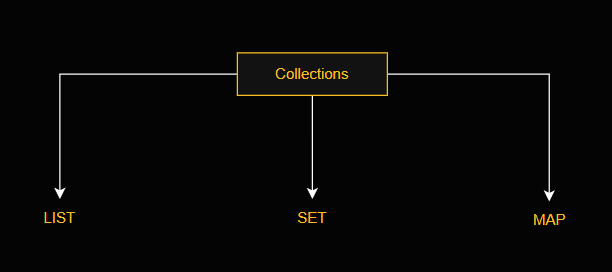
Visual representation of the three main collection types in Apex.
The List Collection
- List is always ordered.
- Can hold duplicate values.
- First index position is always 0.
List<Integer> myList = new List<Integer>(); // Define a new list
myList.add(47); // Adds element to the end
Integer i = myList.get(0); // Retrieve element from index 0
myList.set(0, 1); //Adds the integer 1 to the list at index 0
myList.clear(); // Remove all the elements from the list
The Set Collection
- Set is also a collection of elements
- Collection of same type of elements.
- Set is unordered.
- Set does not hold duplicate values always have to be unique
- First index position is always 0.
// Define a new set
Set mySet = new Set();
// Add two elements to the set
mySet.add(1);
mySet.add(3);
// Assert that the set contains the integer value we added
System.assert(mySet.contains(1));
// Remove the integer value from the set
mySet.remove(1);
The Map Collection
- Map is a Colleciton of key value pairs.
- Keys are always unique,Values can be duplicate.
- if i put a new value with same key then its not show any error insted you will see it replace with new value.
Map m = new Map(); // Define a new map
m.put(1, 'First entry');
m.put(2, 'Second entry');
System.assert(m.containsKey(1)); // Assert that the map contains a key
String value =m.get(2);
System. assertEquals('Second entry', value);
Set s = m.keySet();
Conclusion
Wrap up your thoughts and tell the reader what you plan to build next. This is a great way to keep people interested in your journey.